GRADE 11 THEORY NOTES:
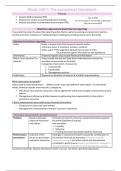
The Browsing experience:
Usability of the websites:
Readability:
Headings
Short paragraphs
Columns
Lists (bulleted)
Group related ideas together
Size, type, colour of fonts
Avoid text all in upper case
Easy coloured backgrounds
Navigation:
Main links should be easy to located and identify
Links should be short – understand what it will take you to
No ‘broken’ links
Links formatted in a consistent and standard way
Consistency:
Same layout
Same colours, fonts, or theme
Layout:
Best suited to the intended audience or readers
Text and graphic objects adapted to fit standard monitor sizes and resolutions
Typography:
Ensure that the font types are:
Easy to read
Match content
Commonly used
Speed:
Pages load quickly
Slow loading typically caused by large files
, Privacy:
Some websites may record your preferences
Facebook and Google may analyse your activity
Malware may install itself on your computer
Spyware:
Any technique or software that tries to monitor and track the way you use your computer, and then to
report this information to a third party.
Tracks use of the internet
Builds a profile of you, for targeted advertising
Can steal login details to gain unauthorized access
Keyloggers capture your keystrokes
Adware:
Free software that is not really free
Displays adverts while the program is running
Can also pop up while you are surfing the web
Ad Blocking software can help to prevent this type of advertising
ICT:
ICTs influence on life:
Jobs we do
Way we:
Store and watch photographs
Entertain ourselves
Shop and do banking
Communicate
Interact with friends
Obtain and use information
Communication:
, Always available
Over-availabilities
Social networking
Instant messaging
Blog and e-mails
Access to information:
Information:
Find quickly
Determine if sources reliable
Analyse and summarise
Examples:
TV/Radio
E-mail
WWW
SMS/MMS
Cellphone calls
Leisure:
Movies, music and printed media available via internet
Video on Demand – from online storage
Internet TV not using radio signals
Online travel bookings
Online computer games
Fitness programs in front of TV with Gaming console
ICTs influence on workplace:
Positive:
Work wherever we access to computer (and internet)
Communicate more effectively
Store and process vast quantities of data to make more informed decisions
Identify and adapt to changing trends
Perform tasks that are difficult or dangerous for humans to do
Perform repetitive mechanical actions with consistent quality.
Empower individuals (smaller companies that make effective use of ICT can compete globally)
Negative:
Requires constant upgrade of skills, hardware and software
The Browsing experience:
Usability of the websites:
Readability:
Headings
Short paragraphs
Columns
Lists (bulleted)
Group related ideas together
Size, type, colour of fonts
Avoid text all in upper case
Easy coloured backgrounds
Navigation:
Main links should be easy to located and identify
Links should be short – understand what it will take you to
No ‘broken’ links
Links formatted in a consistent and standard way
Consistency:
Same layout
Same colours, fonts, or theme
Layout:
Best suited to the intended audience or readers
Text and graphic objects adapted to fit standard monitor sizes and resolutions
Typography:
Ensure that the font types are:
Easy to read
Match content
Commonly used
Speed:
Pages load quickly
Slow loading typically caused by large files
, Privacy:
Some websites may record your preferences
Facebook and Google may analyse your activity
Malware may install itself on your computer
Spyware:
Any technique or software that tries to monitor and track the way you use your computer, and then to
report this information to a third party.
Tracks use of the internet
Builds a profile of you, for targeted advertising
Can steal login details to gain unauthorized access
Keyloggers capture your keystrokes
Adware:
Free software that is not really free
Displays adverts while the program is running
Can also pop up while you are surfing the web
Ad Blocking software can help to prevent this type of advertising
ICT:
ICTs influence on life:
Jobs we do
Way we:
Store and watch photographs
Entertain ourselves
Shop and do banking
Communicate
Interact with friends
Obtain and use information
Communication:
, Always available
Over-availabilities
Social networking
Instant messaging
Blog and e-mails
Access to information:
Information:
Find quickly
Determine if sources reliable
Analyse and summarise
Examples:
TV/Radio
WWW
SMS/MMS
Cellphone calls
Leisure:
Movies, music and printed media available via internet
Video on Demand – from online storage
Internet TV not using radio signals
Online travel bookings
Online computer games
Fitness programs in front of TV with Gaming console
ICTs influence on workplace:
Positive:
Work wherever we access to computer (and internet)
Communicate more effectively
Store and process vast quantities of data to make more informed decisions
Identify and adapt to changing trends
Perform tasks that are difficult or dangerous for humans to do
Perform repetitive mechanical actions with consistent quality.
Empower individuals (smaller companies that make effective use of ICT can compete globally)
Negative:
Requires constant upgrade of skills, hardware and software