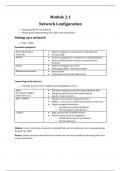
Module 2.1
Network Configuration
Buying hardware and software
Planning and implementing user rights and permissions
Setting up a network
PAN – WAN
Essential equipment
Network Interface Allows computer to communicate with network
Controller On board NIC
Switch Connect computers in a network to a central location
Directs traffic between devices connected to the
network
Cables Connect computers to switch
Fiber optic cables – fast data transfer
Wireless base station Access point
Transmits and receives radio waves
Connecting to the Internet
Consider needs of users, budget, and availability of service
ADSL Permanent digital connection using telephone line
Asymmetric Digital Download speed faster than upload speed
Subscriber Line Small or large networks
WiFi / WiMax Wireless base station using radio waves
WiMax – more secure communication over wider area
Signal strength drop due to
Interference of physical objects
Electromagnetic interference
Cellular Data connectivity to mobile devices
Provide connectivity to computers
Modem that connects to network
Personal hotspot
Modem: coverts data from computer to a format that can be transferred over a communication
channel e.g., ADSL
Router: makes communication between network over internet possible by directing data to its
correct destination
Network Configuration
Buying hardware and software
Planning and implementing user rights and permissions
Setting up a network
PAN – WAN
Essential equipment
Network Interface Allows computer to communicate with network
Controller On board NIC
Switch Connect computers in a network to a central location
Directs traffic between devices connected to the
network
Cables Connect computers to switch
Fiber optic cables – fast data transfer
Wireless base station Access point
Transmits and receives radio waves
Connecting to the Internet
Consider needs of users, budget, and availability of service
ADSL Permanent digital connection using telephone line
Asymmetric Digital Download speed faster than upload speed
Subscriber Line Small or large networks
WiFi / WiMax Wireless base station using radio waves
WiMax – more secure communication over wider area
Signal strength drop due to
Interference of physical objects
Electromagnetic interference
Cellular Data connectivity to mobile devices
Provide connectivity to computers
Modem that connects to network
Personal hotspot
Modem: coverts data from computer to a format that can be transferred over a communication
channel e.g., ADSL
Router: makes communication between network over internet possible by directing data to its
correct destination