Arrays in C
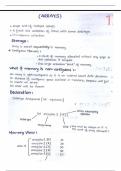
Arrays in C are collections of elements of the same type that are stored in
contiguous memory locations. Arrays allow you to store multiple values in a single
variable, making it easier to manage and process data efficiently.
1. Declaring Arrays
To declare an array in C, specify the data type, the array name, and the size of the
array (the number of elements it can hold).
The basic syntax for declaring an array is:
data_type array_name[size];
Example:
#include <stdio.h>
int main() {
int numbers[5]; // Declaring an array of 5 integers
return 0;
}
Here, numbers is an array of integers that can hold 5 elements. The size of the
array is defined at compile time, and it determines how many elements the array
can store.
2. Initializing Arrays
You can initialize an array at the time of declaration. If you do not explicitly
initialize the array, the values in the array will be garbage values (for local arrays).
Example of initializing an array:
#include <stdio.h>
, int main() {
int numbers[] = {10, 20, 30, 40, 50}; // Initializing an array with 5 elements
// Accessing array elements
for (int i = 0; i < 5; i++) {
printf("Element %d: %d\n", i, numbers[i]);
}
return 0;
}
Here, numbers[] is automatically assigned a size of 5 based on the number of
elements provided.
3. Accessing Array Elements
Array elements are accessed using an index, which starts at 0 for the first
element, 1 for the second, and so on.
Example:
#include <stdio.h>
int main() {
int numbers[] = {10, 20, 30, 40, 50};
// Accessing individual elements
printf("First Element: %d\n", numbers[0]); // Output: 10
printf("Third Element: %d\n", numbers[2]); // Output: 30
return 0;
}
Arrays in C are collections of elements of the same type that are stored in
contiguous memory locations. Arrays allow you to store multiple values in a single
variable, making it easier to manage and process data efficiently.
1. Declaring Arrays
To declare an array in C, specify the data type, the array name, and the size of the
array (the number of elements it can hold).
The basic syntax for declaring an array is:
data_type array_name[size];
Example:
#include <stdio.h>
int main() {
int numbers[5]; // Declaring an array of 5 integers
return 0;
}
Here, numbers is an array of integers that can hold 5 elements. The size of the
array is defined at compile time, and it determines how many elements the array
can store.
2. Initializing Arrays
You can initialize an array at the time of declaration. If you do not explicitly
initialize the array, the values in the array will be garbage values (for local arrays).
Example of initializing an array:
#include <stdio.h>
, int main() {
int numbers[] = {10, 20, 30, 40, 50}; // Initializing an array with 5 elements
// Accessing array elements
for (int i = 0; i < 5; i++) {
printf("Element %d: %d\n", i, numbers[i]);
}
return 0;
}
Here, numbers[] is automatically assigned a size of 5 based on the number of
elements provided.
3. Accessing Array Elements
Array elements are accessed using an index, which starts at 0 for the first
element, 1 for the second, and so on.
Example:
#include <stdio.h>
int main() {
int numbers[] = {10, 20, 30, 40, 50};
// Accessing individual elements
printf("First Element: %d\n", numbers[0]); // Output: 10
printf("Third Element: %d\n", numbers[2]); // Output: 30
return 0;
}