File Handling in C++
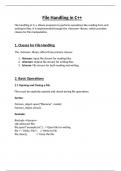
File handling in C++ allows programs to perform operations like reading from and
writing to files. It is implemented through the <fstream> library, which provides
classes for file manipulation.
1. Classes for File Handling
The <fstream> library offers three primary classes:
1. ifstream: Input file stream for reading files.
2. ofstream: Output file stream for writing files.
3. fstream: File stream for both reading and writing.
2. Basic Operations
2.1 Opening and Closing a File
Files must be explicitly opened and closed during file operations.
Syntax:
fstream_object.open("filename", mode);
fstream_object.close();
Example:
#include <fstream>
std::ofstream file;
file.open("example.txt"); // Open file for writing
file << "Hello, File!"; // Write to file
file.close(); // Close the file
, 3. Writing to a File
Example:
#include <fstream>
int main() {
std::ofstream outFile("output.txt");
if (outFile.is_open()) {
outFile << "C++ File Handling\n";
outFile << "Writing to a file example.\n";
outFile.close();
} else {
std::cout << "Unable to open file for writing.\n";
}
return 0;
}
4. Reading from a File
Example:
#include <fstream>
#include <iostream>
#include <string>
int main() {
std::ifstream inFile("output.txt");
std::string line;
if (inFile.is_open()) {
while (getline(inFile, line)) {
std::cout << line << "\n";
}
inFile.close();
} else {
std::cout << "Unable to open file for reading.\n";
}
return 0;
File handling in C++ allows programs to perform operations like reading from and
writing to files. It is implemented through the <fstream> library, which provides
classes for file manipulation.
1. Classes for File Handling
The <fstream> library offers three primary classes:
1. ifstream: Input file stream for reading files.
2. ofstream: Output file stream for writing files.
3. fstream: File stream for both reading and writing.
2. Basic Operations
2.1 Opening and Closing a File
Files must be explicitly opened and closed during file operations.
Syntax:
fstream_object.open("filename", mode);
fstream_object.close();
Example:
#include <fstream>
std::ofstream file;
file.open("example.txt"); // Open file for writing
file << "Hello, File!"; // Write to file
file.close(); // Close the file
, 3. Writing to a File
Example:
#include <fstream>
int main() {
std::ofstream outFile("output.txt");
if (outFile.is_open()) {
outFile << "C++ File Handling\n";
outFile << "Writing to a file example.\n";
outFile.close();
} else {
std::cout << "Unable to open file for writing.\n";
}
return 0;
}
4. Reading from a File
Example:
#include <fstream>
#include <iostream>
#include <string>
int main() {
std::ifstream inFile("output.txt");
std::string line;
if (inFile.is_open()) {
while (getline(inFile, line)) {
std::cout << line << "\n";
}
inFile.close();
} else {
std::cout << "Unable to open file for reading.\n";
}
return 0;